Rivian Apple Watch App: Features, Gen 2 Compatibility & Review
Team GimmieThe Magic Remote for Your Drive: Rivian Apple Watch Integration
Imagine finishing a brutal summer hike. You're drenched, exhausted, and still a quarter-mile from the trailhead where your Rivian R1S is parked. Instead of digging through a backpack for a phone or fumbling for a key fob, you simply press the orange Action Button on your Apple Watch Ultra. You hear the faint chirp of the locks and feel the vibration on your wrist confirming the AC is now blasting at a crisp 68 degrees. By the time you reach the door, the cabin is a sanctuary.
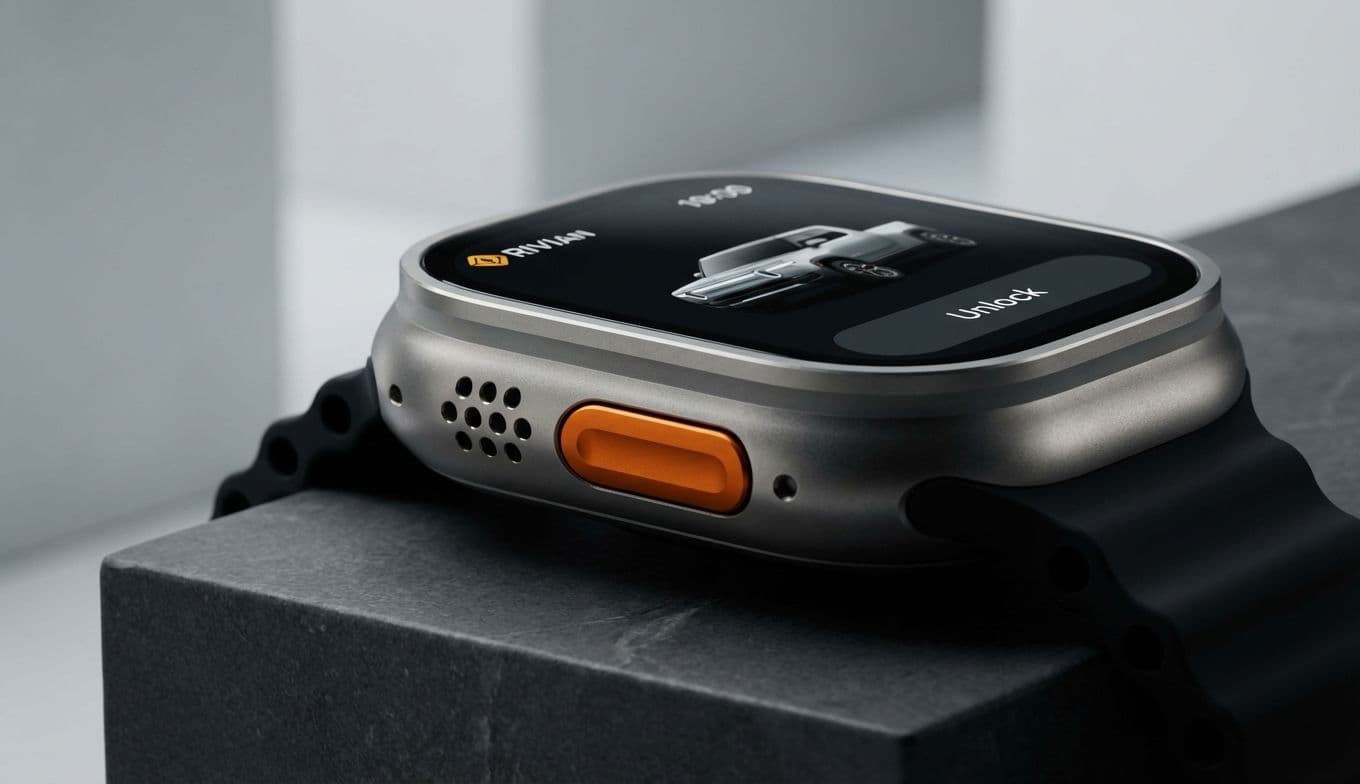
This isn't a futuristic concept—it is the reality Rivian is building. The automaker is moving beyond the basic digital key functionality introduced for its Gen 2 vehicles and is reportedly launching a dedicated Apple Watch app. This move transforms the watch from a simple proximity sensor into a full-fledged magic remote for your vehicle. It is a bold play in the world of wearable tech, and as someone who has tested countless smart integrations that promised the world and delivered a headache, I am looking at this with a mix of genuine excitement and a healthy dose of skepticism.
The Command Center on Your Wrist
The jump from a digital key to a dedicated app is significant. Until now, your watch could unlock the door, but it couldn't tell you much else. The new integration aims to put the entire vehicle dashboard on your wrist. We are talking about real-time charge status, cabin temperature controls, and even the ability to vent windows or open the "frunk" without ever touching your phone.
The real winner here is the hardware synergy. For owners of the Apple Watch Ultra or Ultra 2, the programmable Action Button becomes the ultimate shortcut. Imagine mapping that button specifically to Rivian’s pre-conditioning feature. It eliminates the need to wake the screen, find the app, and wait for a menu to load. It turns a multi-step digital process into a single, tactile click. This is where ambient computing actually starts to make sense—when the technology gets out of your way and just does what you need it to do.
However, for this to work, the software needs to be lightning-fast. If you’re standing in the rain waiting for your watch to "handshake" with your truck, the magic evaporates instantly. Rivian needs to ensure that the Bluetooth and LTE handoffs are seamless, or this will quickly transition from a must-have feature to a frustrating gimmick.

The Ultimate Gift Guide: Who Is This For?
If you are looking for a gift for the Rivian owner in your life, this software update changes the hardware game. You aren't just buying them a watch; you’re buying them a specialized tool for their vehicle. Here is how to think about the different personas:
The Tech-Forward Spouse: This is the person who already has the smart home lights, the latest iPhone, and a dedicated charging station in the garage. For them, an Apple Watch Series 10 or the Ultra 2 isn't just a timepiece—it's the missing link in their digital ecosystem. Pairing the watch with the new Rivian app allows them to manage their commute with surgical precision.
The Adventure Seeker: If your partner spends their weekends overlanding, surfing, or mountain biking, the Apple Watch Ultra 2 is the clear choice. Its rugged titanium build and the aforementioned Action Button make it the perfect companion for someone who is often active, gloved, or away from their phone. Being able to secure the vehicle or check range while halfway up a mountain trail adds a layer of safety and convenience that is hard to beat.
The Busy Parent: We’ve all been there—carrying a toddler in one arm and three bags of groceries in the other. For the parent who never has enough hands, the ability to pop the liftgate with a wrist gesture is a genuine lifesaver. In this scenario, even a standard Apple Watch SE becomes a high-value utility tool.
The Hardware Reality Check
Before you rush out to buy a new wearable, there are some technical hurdles to consider. This isn't a universal rollout for every Rivian on the road. This deep level of integration is likely tied to the newer Gen 2 hardware, which features the updated electrical architecture necessary for high-speed communication between the car and wearable devices. If you’re driving an older R1T, you might be left looking at your wrist with a bit of envy.
Then there is the question of battery life. Constant communication between a watch and a vehicle can be a power hog. Apple has made strides with its latest S10 and S2 SiP chips to manage background tasks more efficiently, but users will need to see if "vehicle standby" starts draining their watch before the end of the day.
Security is the other elephant in the room. Your watch is now a literal key to a six-figure vehicle. Rivian and Apple have to ensure that the encryption is ironclad. Apple’s Secure Element handles the digital key side of things well, but as the app adds more features—like remote starting or window control—the surface area for potential glitches or security gaps increases.
What to Watch For in the Coming Months
As Rivian prepares for a wider release, there are a few benchmarks that will determine if this is a success or a stumble:
User Interface Simplicity: A watch screen is tiny. If Rivian tries to cram too many buttons into the app, it will be unusable. We want big, clear icons and haptic feedback that confirms a command was actually sent.
Offline Functionality: What happens when you’re camping in a dead zone? The watch needs to be able to communicate locally via Bluetooth when LTE isn't available, or the "adventure" part of Rivian's brand promise falls apart.
Subscription Models: There is always a fear in the modern EV world that "convenience features" will eventually be tucked behind a monthly paywall. Whether this app remains a free perk for owners or becomes part of a "Connect+" subscription will be a major sticking point for consumers.
The Final Verdict
Is this tech a game-changer or just another way to stay tethered to our screens? At Gimmie AI, we generally believe that the best technology is the kind that removes friction from your daily life. Rivian’s move toward deeper Apple Watch integration does exactly that—provided you are already bought into the ecosystem.
For the Rivian owner, the value added here is undeniable. It turns the vehicle into a more responsive, personalized tool. However, the heavy "ecosystem lock-in" is a real trade-off. If you’re an Android user or someone who prefers a mechanical timepiece, you are essentially locked out of these convenience gains.
The Gimmie AI Stance: If you already own a Gen 2 Rivian and an iPhone, an Apple Watch Ultra 2 is now the single best accessory you can buy for your truck. The "Magic Remote" experience is worth the price of admission for the sheer convenience of the Action Button shortcuts alone. But if you're not already in that ecosystem, don't let this be the only reason you switch. It’s a brilliant refinement of the ownership experience, but it’s an enhancement, not a necessity. At least, not yet.